

Python for AI & ML - Day 11: Introduction to NumPy

Goal: Master NumPy, the foundation of numerical computing in Python, and understand its critical role in AI/ML for handling large datasets and performing fast mathematical operations.
1. What is NumPy?
NumPy (Numerical Python) is a library for efficient array processing and vectorized operations. It is the backbone of nearly every scientific Python library, including Pandas, SciPy, and TensorFlow.
Why NumPy for AI/ML?
Speed: Optimized C/C++ backend for fast computations.
Memory Efficiency: Stores data in contiguous memory blocks.
Vectorization: Avoid loops with array operations (e.g.,
array * 2).Broadcasting: Perform operations on arrays of different shapes.
2. Installing NumPy
pip install numpy Import the library:
import numpy as np # Standard alias 3. The NumPy Array (ndarray)
Key Features
Homogeneous (all elements have the same data type).
Fixed size (resizing creates a new array).
Supports vectorized operations (element-wise computations).
Creating Arrays
# From a list
arr1 = np.array([1, 2, 3])  # 1D array
arr2 = np.array([[1, 2], [3, 4]])  # 2D array

# Special arrays
zeros = np.zeros((3, 3))  # 3x3 matrix of zeros
ones = np.ones((2, 4))    # 2x4 matrix of ones
identity = np.eye(3)      # 3x3 identity matrix
range_arr = np.arange(0, 10, 2)  # [0, 2, 4, 6, 8]
linspace = np.linspace(0, 1, 5)  # 5 evenly spaced values: [0., 0.25, 0.5, 0.75, 1.]
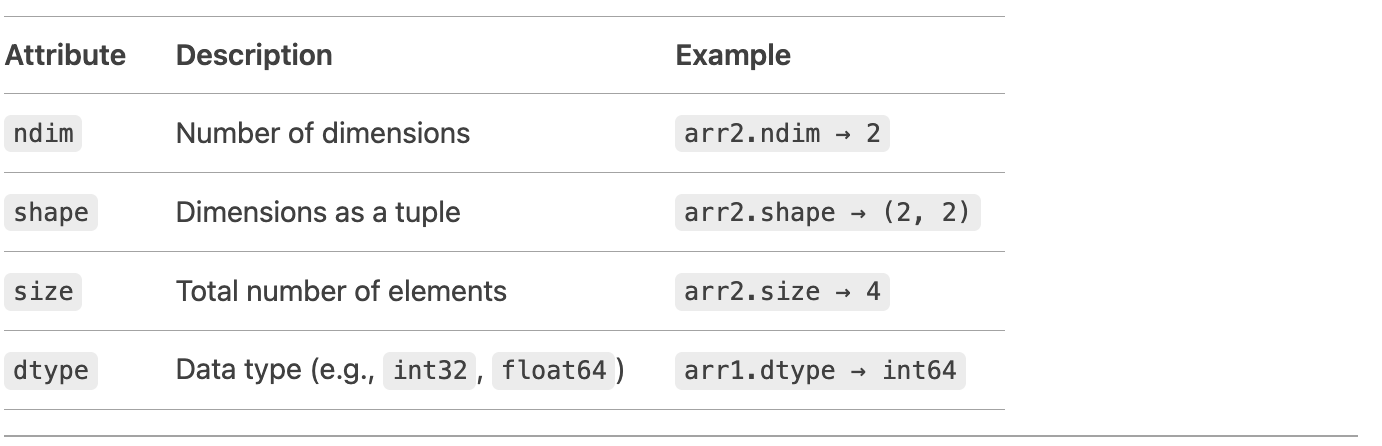
4. Array Attributes
5. Array Operations
Reshaping
arr = np.arange(6).reshape(2, 3) # [[0, 1, 2], [3, 4, 5]] Stacking
a = np.array([1, 2])
b = np.array([3, 4])
np.vstack((a, b))  # Vertical stack → [[1, 2], [3, 4]]
np.hstack((a, b))  # Horizontal stack → [1, 2, 3, 4]
Mathematical Operations
arr = np.array([1, 2, 3])
print(arr + 2)   # [3, 4, 5] (element-wise addition)
print(arr * 3)   # [3, 6, 9]
print(arr ** 2)  # [1, 4, 9]
Aggregation Functions
arr = np.array([[1, 2], [3, 4]])
print(np.sum(arr))     # 10 (sum all elements)
print(np.mean(arr))    # 2.5 (mean)
print(np.max(arr, axis=0))  # [3, 4] (max along columns)
6. Indexing and Slicing
Works similarly to Python lists but supports multi-dimensional slicing.
1D Array
arr = np.array([0, 1, 2, 3, 4])
print(arr[1:4])  # [1, 2, 3]
2D Array
matrix = np.array([[1, 2, 3], [4, 5, 6], [7, 8, 9]])
print(matrix[1, 2])     # 6 (second row, third column)
print(matrix[:, 0])     # [1, 4, 7] (first column)
print(matrix[1:3, 0:2]) # [[4, 5], [7, 8]] (submatrix)
7. Universal Functions (ufunc)
Precompiled C functions for fast element-wise operations:
arr = np.array([1.5, 2.3, -3.7])
print(np.abs(arr))    # [1.5, 2.3, 3.7]
print(np.sqrt(arr))   # Square roots
print(np.exp(arr))    # Exponentials
print(np.sin(arr))    # Trigonometric functions
8. Broadcasting
NumPy automatically "broadcasts" smaller arrays to match larger ones for operations:
a = np.array([[1, 2], [3, 4]])  # Shape (2, 2)
b = np.array([10, 20])           # Shape (2,)
print(a + b)  # [[11, 22], [13, 24]] (b is broadcast to [[10,20], [10,20]])
Rules for Broadcasting:
Dimensions are compared from right to left.
Each dimension must either be equal or one of them must be 1.
9. Why NumPy Over Python Lists?
FeatureNumPy ArraysPython ListsSpeedOptimized C codeSlower for large dataMemoryContiguous memory blocksScattered memoryFunctionalityBuilt-in math functionsRequires loopsData TypesHomogeneousHeterogeneous
10. Real-World AI/ML Applications
Image Processing: Represent images as 3D arrays (height × width × RGB).
Dataset Handling: Convert CSV data to arrays for model training.
Linear Algebra: Matrix operations for neural networks.
Practice Exercise
Create a 3x3 matrix of random integers between 0 and 10.
Compute the mean of each row.
Normalize the matrix by dividing each element by the maximum value.
Solution:
# 1. Create matrix
matrix = np.random.randint(0, 10, size=(3, 3))

# 2. Row-wise mean
row_means = np.mean(matrix, axis=1)

# 3. Normalize
normalized = matrix / np.max(matrix)
Key Takeaways
NumPy arrays are fast, memory-efficient, and enable vectorized operations.
Indexing/Slicing: Access data in multi-dimensional arrays.
Broadcasting: Perform operations on arrays of different shapes.
What’s Next?
Day 12 introduces Pandas, the go-to library for data manipulation and analysis. You’ll use it to clean, transform, and analyze real-world datasets!
By mastering NumPy today, you’ve unlocked the ability to handle numerical computations efficiently—a cornerstone of AI/ML! 🚀