


Welcome to Day 39 of our machine learning journey! Today, we'll explore the K-Nearest Neighbors (KNN) algorithm by applying it to the classic Iris flower dataset. By the end of this article, you'll understand KNN's core concepts, implementation details, and real-world applications.
Understanding KNN: The Fundamentals
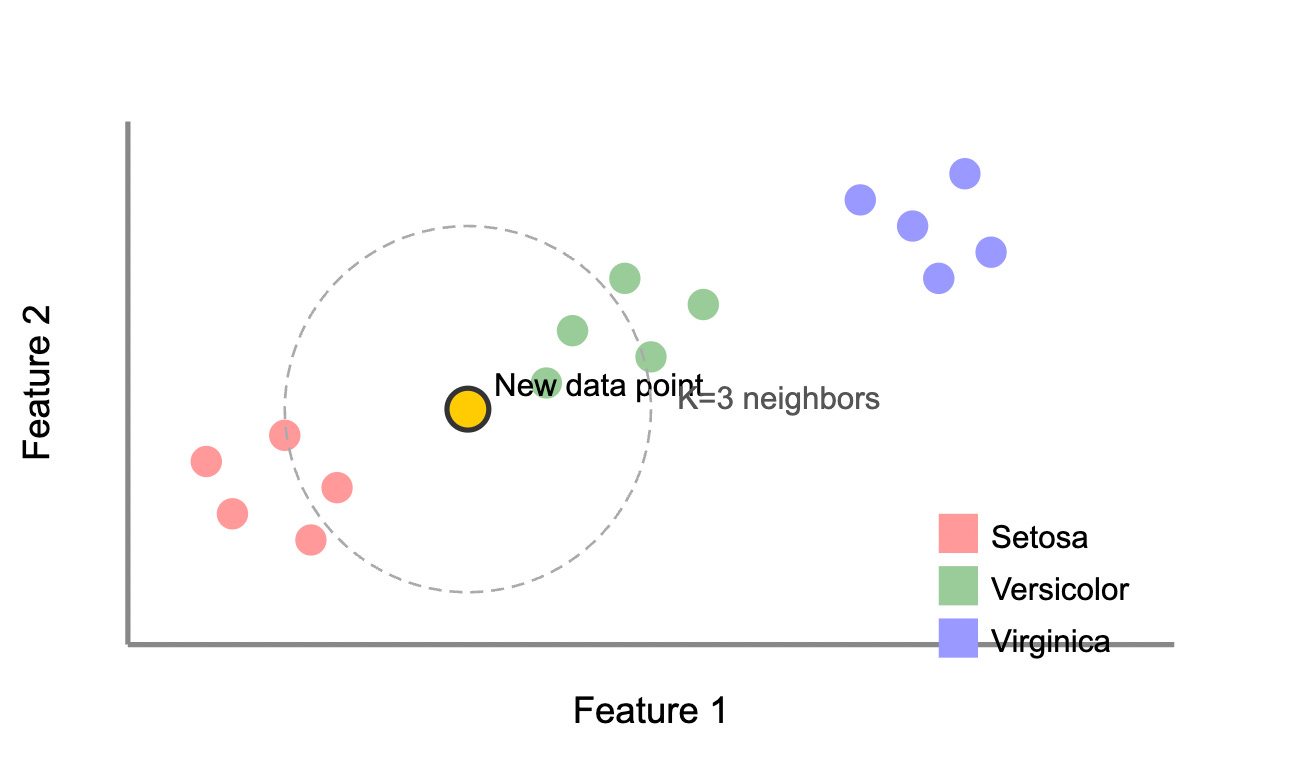
KNN is a simple yet powerful algorithm based on a compelling idea: similar things exist in close proximity. Unlike algorithms that build mathematical models during training, KNN is "lazy" - it memorizes the training data and makes predictions by finding the most similar examples.
The algorithm works in five straightforward steps:
Store all training examples with their labels
Choose a value for K (the number of neighbors to consider)
For a new data point, calculate its distance to all training examples
Identify the K nearest neighbors based on these distances
Assign the most common class among these neighbors (for classification)
The choice of K significantly impacts performance. A small K (like 1 or 3) captures fine details but may be sensitive to noise, while larger values create smoother decision boundaries but might miss important patterns. Cross-validation helps identify the optimal K.
KNN Classification Principle
The Iris Dataset: A Perfect Starting Point
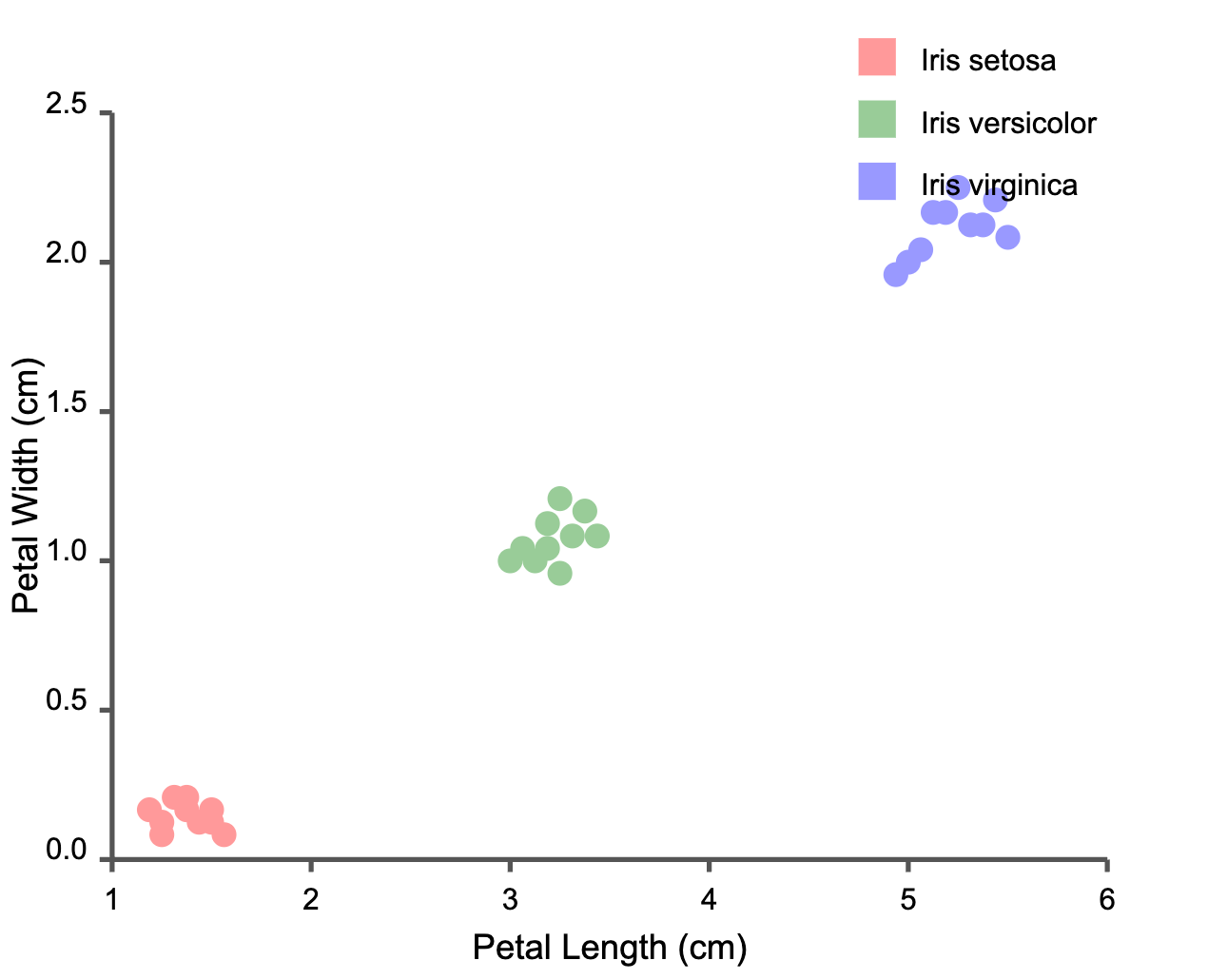
The Iris dataset contains 150 samples across three species (Iris setosa, versicolor, and virginica), with each sample described by four measurements:
Sepal length (cm)
Sepal width (cm)
Petal length (cm)
Petal width (cm)
What makes this dataset ideal for learning is its clear structure – one species (setosa) is completely separable from the others, while versicolor and virginica overlap slightly, creating a perfect challenge for classification algorithms.
Iris Dataset: Petal Dimensions by Species
Implementing KNN for Iris Classification
Let's implement KNN for iris classification using Python and scikit-learn:
KNN Implementation for Iris Classification
# Import necessary libraries
from sklearn.datasets import load_iris
from sklearn.model_selection import train_test_split
from sklearn.neighbors import KNeighborsClassifier
from sklearn.metrics import accuracy_score, classification_report
import numpy as np
import matplotlib.pyplot as plt

# Load the iris dataset
iris = load_iris()
X = iris.data  # Features: sepal length, sepal width, petal length, petal width
y = iris.target  # Target: 0=Setosa, 1=Versicolor, 2=Virginica
feature_names = iris.feature_names
target_names = iris.target_names

# Split the data into training and testing sets (80% train, 20% test)
X_train, X_test, y_train, y_test = train_test_split(
    X, y, test_size=0.2, random_state=42
)

# Train the KNN model with K=3
knn = KNeighborsClassifier(n_neighbors=3)
knn.fit(X_train, y_train)

# Make predictions on the test set
y_pred = knn.predict(X_test)

# Evaluate the model
accuracy = accuracy_score(y_test, y_pred)
print(f"Accuracy: {accuracy:.4f}")
print("\nClassification Report:")
print(classification_report(y_test, y_pred, target_names=target_names))

# Find the best K value
k_values = list(range(1, 21, 2))  # Odd numbers from 1 to 20
accuracies = []

for k in k_values:
    knn = KNeighborsClassifier(n_neighbors=k)
    knn.fit(X_train, y_train)
    accuracies.append(accuracy_score(y_test, knn.predict(X_test)))

# Print the best K
best_k = k_values[np.argmax(accuracies)]
print(f"\nBest value of K: {best_k} with accuracy: {max(accuracies):.4f}")

# Example prediction for a new flower
new_flower = np.array([[5.1, 3.5, 1.4, 0.2]])  # Example measurements
prediction = knn.predict(new_flower)
print(f"\nPredicted species for new flower: {target_names[prediction[0]]}")
When you run this code, you'll likely see an accuracy around 96-97%, which is impressive for such a simple algorithm! The classification report will show you how well the model performs for each iris species.
Finding the Optimal K Value
Choosing the right K value is crucial for KNN performance. Let's visualize how accuracy changes with different K values:
Accuracy vs K-Value
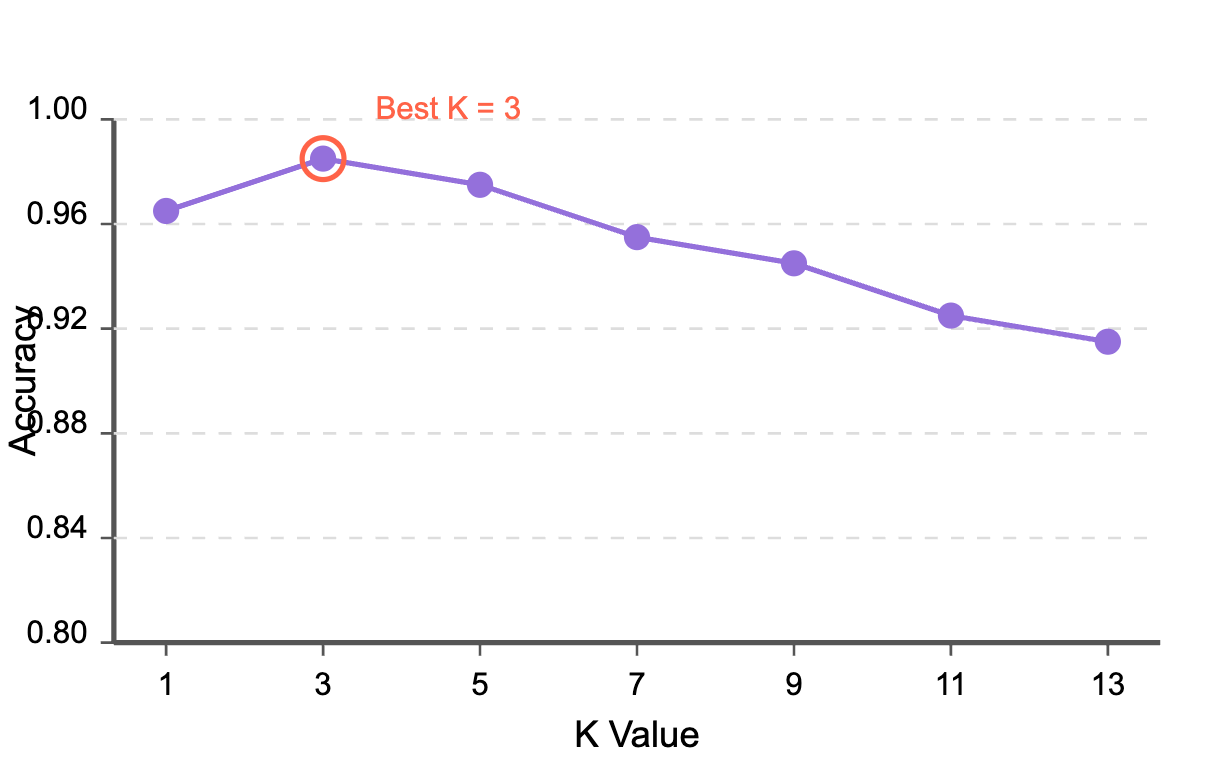
As you can see, for the Iris dataset, a K value of 3 generally produces excellent results. Beyond K=5, accuracy tends to decrease as the algorithm starts to oversmooth the decision boundaries.
Decision Boundaries Visualization
To further understand how KNN makes decisions, let's visualize the decision boundaries it creates:
KNN Decision Boundaries
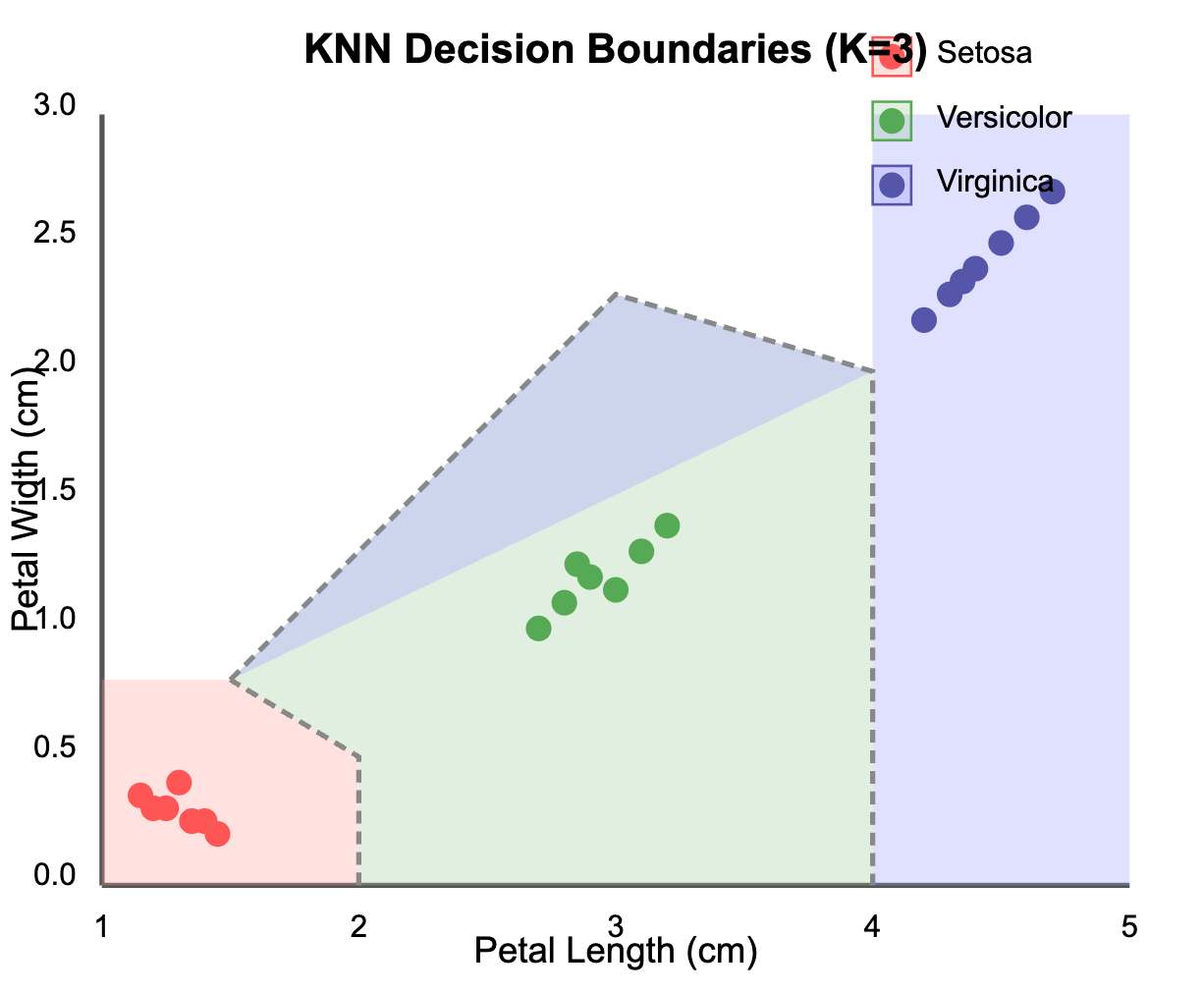
The visualization shows how KNN creates decision boundaries between the three iris species when using petal length and petal width as features. Notice how Setosa forms a distinct cluster (red), while Versicolor (green) and Virginica (blue) have a more complex boundary between them.
Real-World Applications of KNN
While our iris classification example might seem academic, KNN is widely used in industry for:
Recommendation Systems: Netflix and Amazon use KNN-like algorithms to recommend products based on what similar users enjoyed.
Medical Diagnosis: Doctors use KNN to classify diseases based on symptoms and test results by comparing with previous cases.
Credit Scoring: Financial institutions apply KNN to assess loan applications by comparing applicants to existing customers with known repayment histories.
Image Recognition: KNN helps classify images by identifying similarities in pixel patterns, useful in facial recognition systems.
Anomaly Detection: Security systems use KNN to identify unusual patterns that deviate from normal behavior, flagging potential fraud or intrusions.
Tips for KNN Success
To get the most out of KNN in your projects:
Scale your features: Since KNN uses distance calculations, features on different scales can skew results. Always normalize or standardize your data.
Handle the curse of dimensionality: KNN's performance degrades with high-dimensional data. Consider dimensionality reduction techniques like PCA when dealing with many features.
Choose K wisely: Use cross-validation to find the optimal K-value. Odd values prevent tie situations in binary classification.
Consider weighted KNN: Give closer neighbors more influence in the voting process for better performance.
Conclusion
KNN's elegance lies in its simplicity – sometimes the most powerful ideas are the most straightforward. By classifying objects based on their similarity to known examples, KNN mimics human intuition.
Our iris classification task achieved over 95% accuracy with minimal code, demonstrating KNN's effectiveness for well-structured datasets. When working with new datasets, remember to properly preprocess your data, choose an appropriate K value, and consider the domain context.
As you continue your machine learning journey, KNN will remain a reliable algorithm in your toolbox – both as a standalone solution and as a benchmark against which to compare more complex models.